Ever wondered why your Android phone slows down and behaves sluggishly? Often, the phone isn’t able to handle multitasking, apps don’t open fast, and the animations take forever to run. Ever thought, what might be the reason behind this dumb and slow performance?
The reason is simple: poor user handling. It isn’t always about the age of your Android phone; it’s the user's fault to follow up with proper phone clean-up. Don’t get mistaken with the idea of getting a new phone; the solution can be very simple. Follow these tips to increase phone speed manually and make it a habit regularly.
Understand its causes that work through good performance of your phone, rather than jumping into a conclusion. Let’s learn these few steps that will enhance the performance of your phone effectively.
Table of Content
Why is Android Phone So Slow?
There might be several reasons for an Android phone to perform slowly over time:
- The phone might be running out of storage space.
- The Android version might be outdated.
- The load of different apps installed and running in the background can start using up a lot of storage space with cached data.
- Overloaded cache data in the mobile browser or in the social media apps can cause clogged functioning and slow down the device.
- The delay in installing the latest version of Android is affecting the performance and creating bugs.
- Issues of hardware, like overheating of the device, a defect in the RAM or CPU, or a defective battery, result in slow running of the Android phone.
- Phone viruses or Malware can use up system resources, causing the phone to behave unpredictably or slow down.
How to Speed up Android Phone?
There are various ways to speed up Android phones. You can start by taking simple steps of troubleshooting, like cleaning up the apps, restarting the phone, reducing the redundant background activity, and clearing cache data from the apps. If all of these ways don’t work out, then there might be an issue of malware in the device that’s affecting smooth functioning.
Try these steps to optimize the performance of the Android phone, avoiding it from running slowly and regaining performance like new again.
Restart the Phone
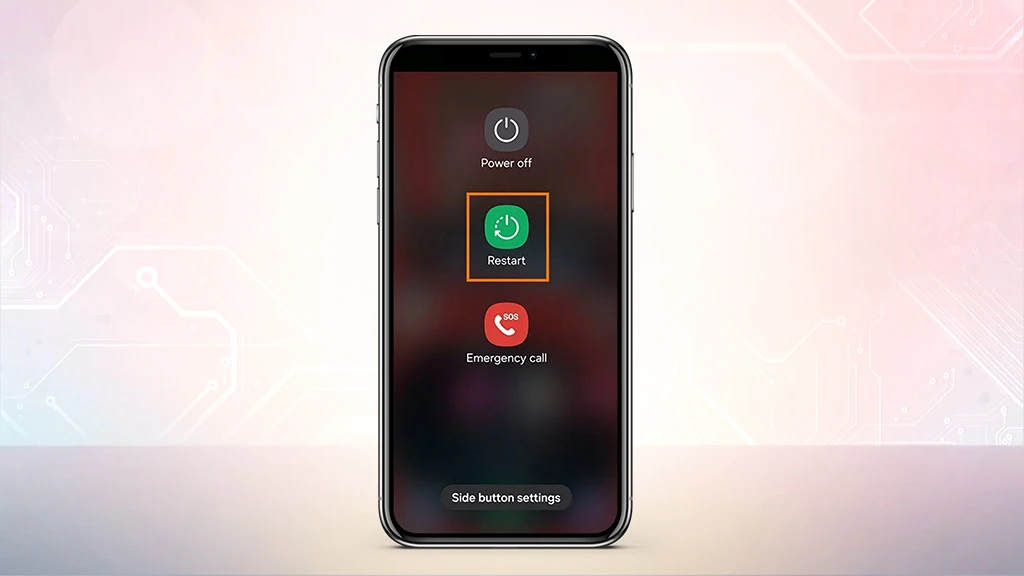
Whenever an Android phone slows down or starts getting glitches in running multiple apps at once, start by restarting the device. This way the device clears the memory leaks and stops all the background apps that’s draining the battery.
Steps: Hold the power button for 5 to 10 seconds and click on Restart. Perform this at least once a week to avoid, bugs in phone performance and phone’s battery life.
Check your Android Device for Updates
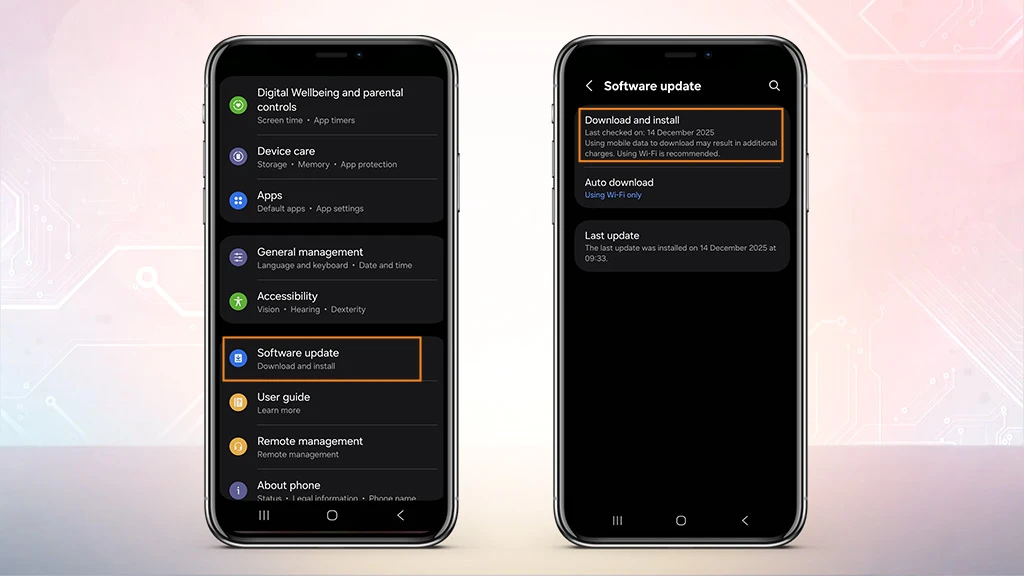
There can be another common neglected point in making the device work slowly, check for software updates on your device.
Steps: Go to settings> System> System update and tap on check for update.
If there is an available software update, select it and download to help the device optimize and run smoothly.
Free up Storage Space
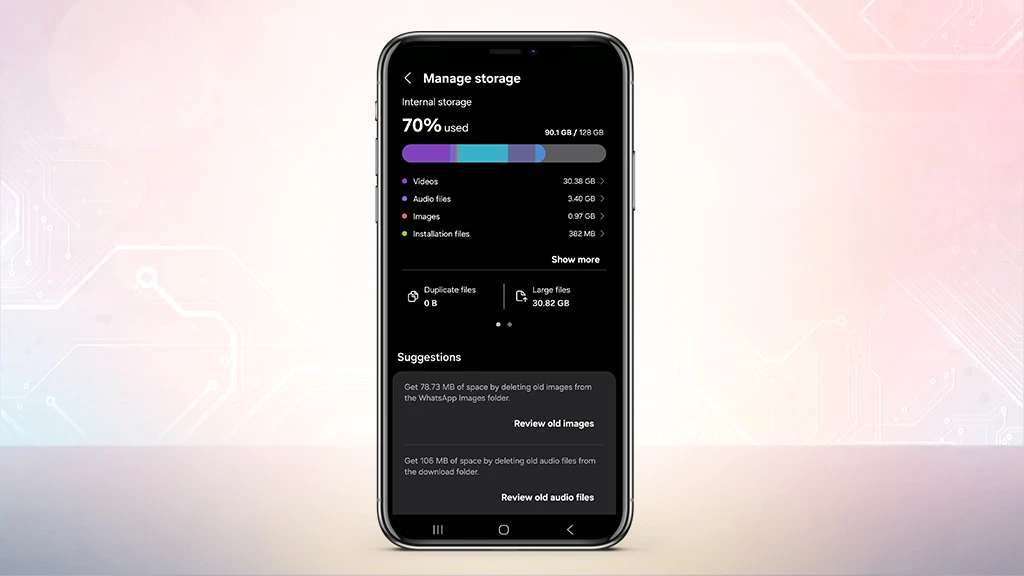
Freeing up the storage space will drastically boost the performance of the phone by increasing its speed. Often the phone suggests for deleting large junk files, permission to remove unused apps and large-sized videos. Following these steps helps in optimizing the speed of the android phone and makes space for new storage.
Steps: Go to Settings> Storage>Free up cache (delete large files, unused applications and any backed-up media.
Clear your Cache
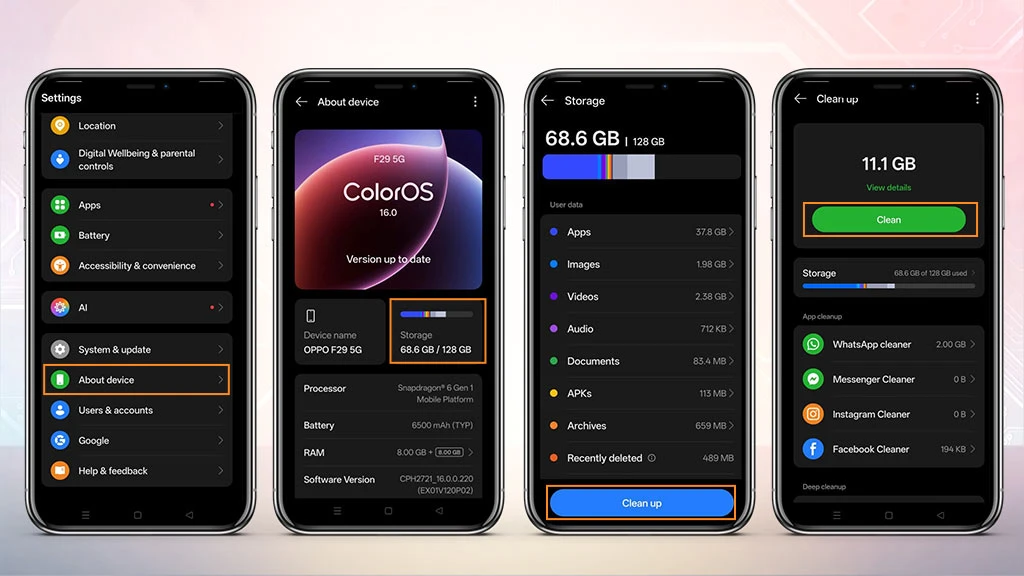
The temporary cache data files are known as ‘cache.’ These help apps to load quickly, but when they build up excessive files, the performance of the phone reduces. Regular clearing of these cache files can boost the speed without affecting the personal data (messages or photos).
Steps: Settings>About phone>Storage> Cleaner>Clean up (Tick the files you want to delete)
Uninstall Unused Apps
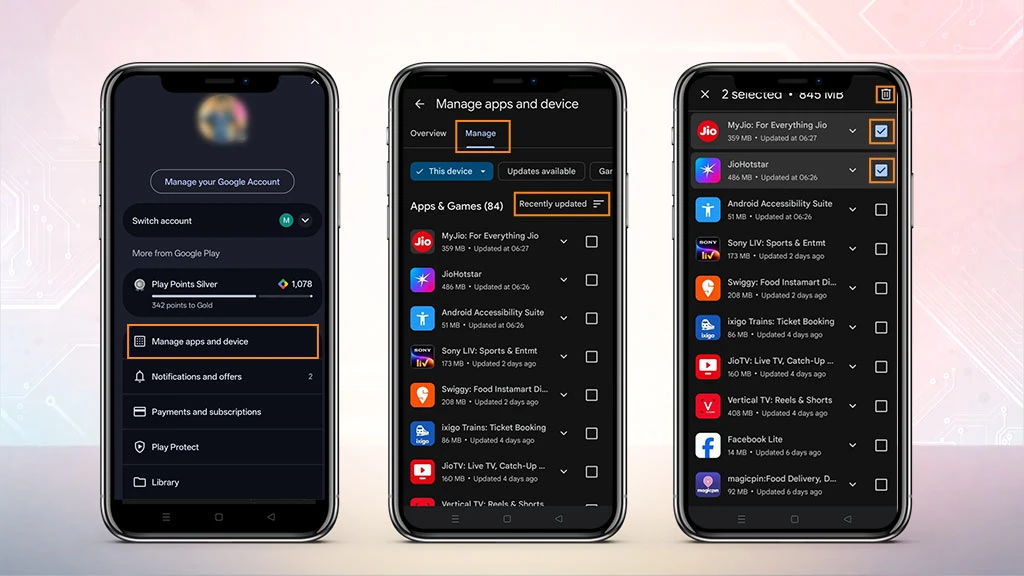
If there are lot of apps that are of no use and are unnecessarily holding up space, follow these steps. Select all the apps that are not in use and delete them by tapping the trash icon to free up the system resources immediately.
Steps: Open Google Play Store, click on your Profile Icon > Manage apps & device > Manage, and sort by app that are least used.
Turn off Animation
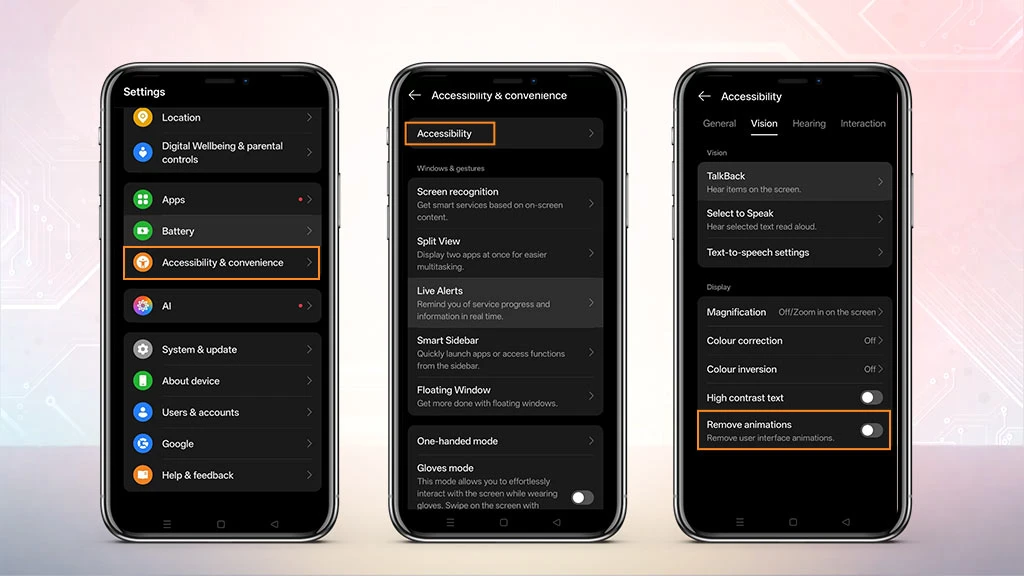
To make your phone work fast, you can always turn off visual animations like the shrinking effect that happens while closing the apps. These animations make the phone look good, but they use a lot of processing power. Disabling these animations will improve the responsiveness of the phone.
Steps: Go to settings> Accessibility> Vision enhancements and move to Remove animations.
Use the Lite Edition Apps
Apps like Facebook, Instagram, and Spotify offer the ‘Lite’ version that are smaller, simplified in design and use less storage and memory. If your phone is running slow, go to Google Play Store and search for "Lite" versions of your favorite social media apps to help the phone run faster and perform better.
Remove Excessive Widgets
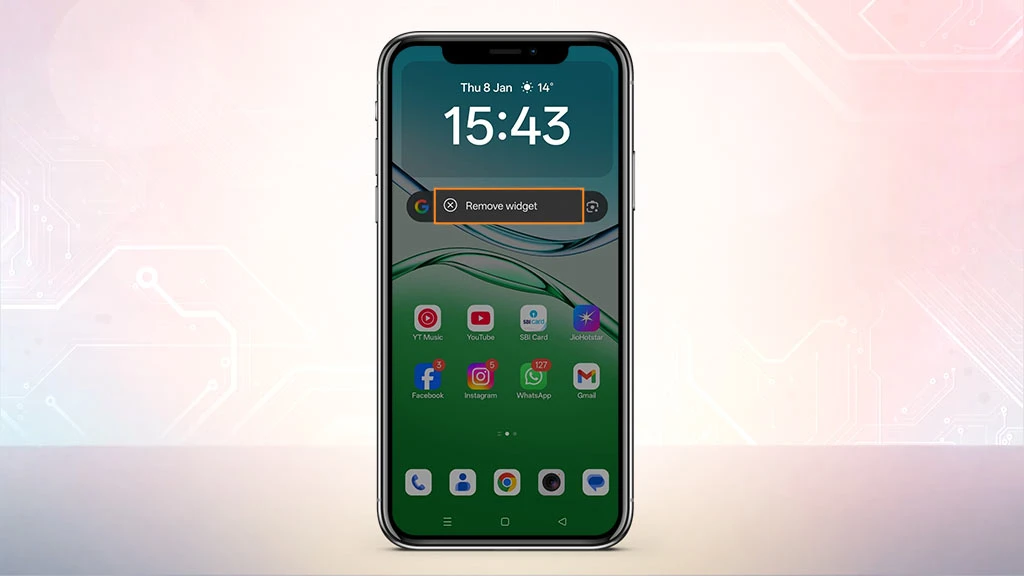
Do you use widgets on your phone? For e.g. calendar, clock, weather updates, etc. These widgets play a very fun role in adding activities to the home screen. They provide more information from particular apps and add a different look or personality to the phone. By removing these unnecessary widgets, the phone’s speed increases and gives an instant boost.
Steps: Touch and hold the Widgets> tap on Remove
Turn off Sync and Background Data
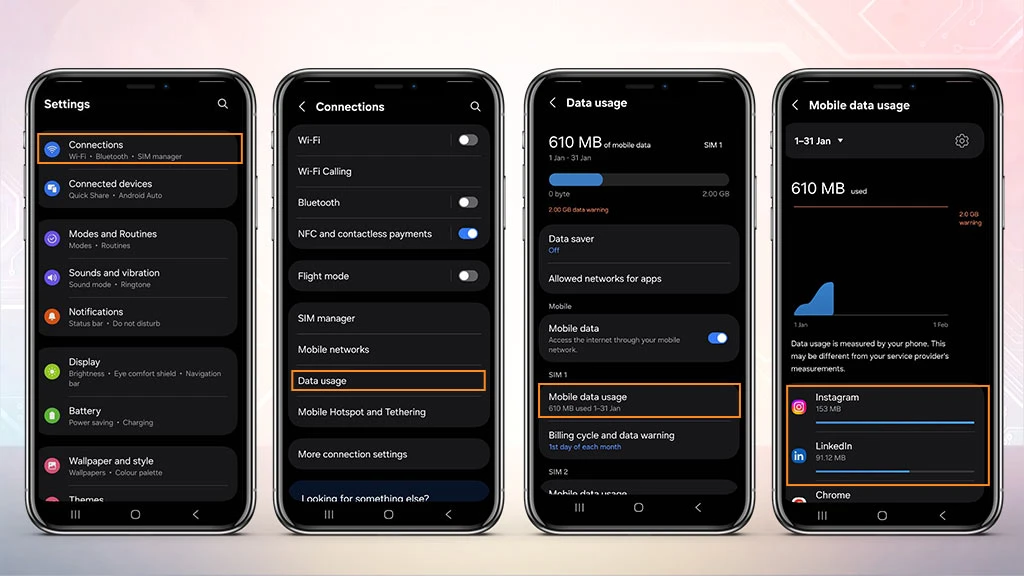
In the process of speeding up the performance of your phone, stop the apps that are constantly updating in the background. But the notifications will not pop-up until you actually open the phone. Removing them will prevent the device from working too hard in the background. For this process, you’ll need to open each app individually.
Steps: Settings>Connections>Data usage>tap the settings icon for the mobile data network> Mobile data usage> scroll down and tap each app to turn off background data>Disable background data.
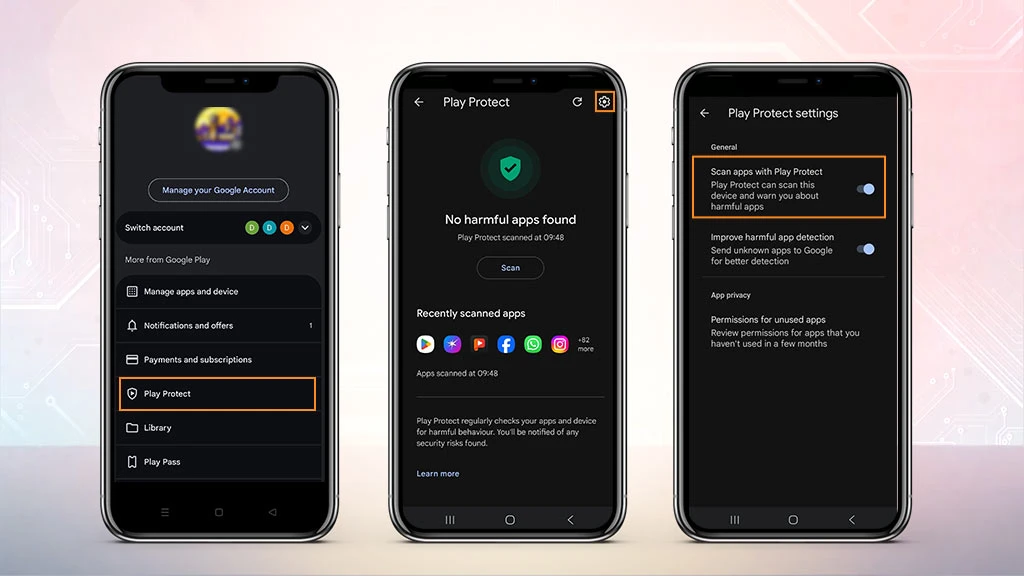
Check for Malware on your Phone
If all of the above steps are not helpful enough to make your Android phone perform faster, then there could be a possibility of malware. If any harmful apps are detected, the device will provide options to remove them. To find malware in the phone, follow these steps:
Google play>Profile or menu icon>Play Protect>Scan
Factory Reset
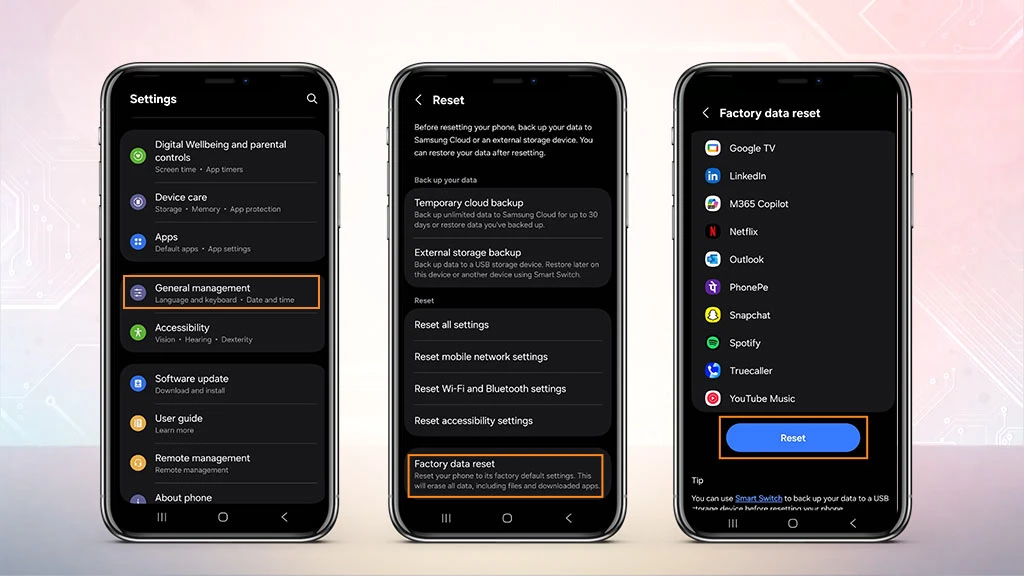
The factory reset is the last-case scenario that can restore the phone’s original speed by wiping off the entire data of the phone. This process will erase everything permanently, including media, messages and apps, so make sure to back up the data first. Also, keep in mind that the device should have enough battery when the factory reset happens. Consider this option only if none of the above works out in uplifting the mobile speed check.
Steps: Go to Settings>General management> Reset>Factory data reset> Reset.
Conclusion
Phones have become part of our daily lives, managing our daily tasks and minor necessities. It is important to check its performance and keep its functioning smooth, as it should not spoil your scheduled day, causing inconvenience with its slow performance. Follow these tips mentioned above to boost the performance of your phone. Know how to make an Android phone faster with a few practical steps so that the phone stays optimized for top-performing speeds.
Frequently Asked Questions On How Can You Speed Up Your Slow Android Phone?
1. How to make a slow Android phone faster?
For speeding up your Android phone, follow these simple fixes first:
• Restart the phone
• Uninstall unused apps
• Clear all app caches.
• Free up storage.
2. How can I remove lag?
There are 5 easy ways to reduce and fix lag:
• Check the Wi-Fi connection, try to shift the location of your router to centre of the home.
• Boost the Wi-Fi signal and speed.
• Reduce the bandwidth of other programs and applications.
• Mainly fix the network of your home.
3. How do I clear my phone’s cache?
Simple steps to clear your phone’s cache are:
• Clear browsing data from the browser app like chrome.
• Clear app caches individually
• Follow these steps for assistance, go to phones setting menu, go under the Apps menu, select app>Storage>Clear Cache.
4. Does clearing cache improve phone speed?
Clearing all the cache can improve the performance of your phone, as it removes the outdated files, making more storage space and allowing the phone to access information more easily.
5. How to increase mobile speed?
To increase the mobile speed, keep these steps in mind:
• Regularly practice restarting the phone.
• Keep the software updated.
• Manage all the background apps.
• Clean the storage by removing the large files.
• Uninstall the unused apps.
• Clear cache/data.






Related Blogs